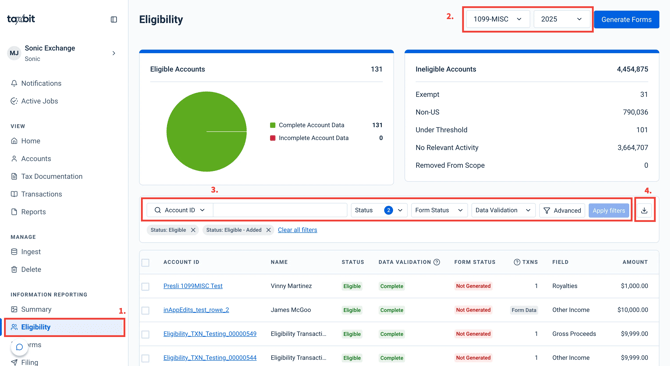
Description
The Eligibility Page in the Information Reporting module is the control center for understanding which accounts are eligible for a given tax form and tax year, reviewing their data quality, and kicking off form generation and QA workflows. The Eligibility page is driven by Taxbit’s eligibility determination logic, which evaluates Account Owner data, Transaction, and/or Form Data thresholds, to determine whether each account should be reported for a selected form type (e.g., Forms 1099, MRDP). For more details on what makes an account eligible for each form type, please select the specific form from our Supported Tax Forms guide.
Please note: If you do not see a form type that you are contracted for, please contact our customer support team by submitting the following online submission form.
At the top of the Eligibility page, you’ll see summary tiles for Eligible Accounts and Ineligible Accounts. The Eligible section includes a pie chart that breaks down how many eligible accounts have complete vs. incomplete data, helping you quickly see how much remediation is needed before you generate forms.
The Eligibility Table will allow you to dive into the details of the status of each Account. The table lists one row per account with key fields such as Account ID, Name, Eligibility Status, Account Validation status, Form Status, and relevant transaction/form data (e.g., reportable transaction counts and amounts).
Additionally, please refer to this guide for a summary of each possible status: Eligibility Statuses
Please note: For convenience, the table will be pre-filtered to display all Eligible Accounts. Select “Clear All” to remove these filters, if needed.
Available Actions
From the Eligibility page, you can perform the actions listed below. For more details, please refer to the accompanying guide.
- Generate forms (How to Generate Tax Forms)
- Add or remove accounts from scope (How to Add and Remove Accounts From Scope)
- Review Data Gaps (How to Identify Incomplete Data)
- Download QA Packages (QA Package)
- Identify Data Changes (Data Changes and Corrections)
- Export the available Eligibility Table Exports (Eligibility Table Exports):
- Data Validation Report
- Form Data Export
- Account Owner/Account Export
- Filter by one Account ID or Name
- Filter by Eligible Status, Data Validation, Form Status, Data Change, or Filer by selecting the Filter button in the top left of the table. You may also filter the table using a list of up to 10,000 Account IDs, which can be copy and pasted in from an Excel file.
How to Access
Step 1: Select “Eligibility” from the left navigation under Information Reporting.
Step 2: Then, select the form and tax year that you wish to review from the top right.
Step 3: Filter to any accounts that you would like to review.
Step 4: Click the download button on the right to export the available Eligibility Table Exports referenced above.