
Transactions synced into the Taxbit Accounting Suite will appear with a category of Uncategorized In/Out, Internal Transfer, or Swap until the category is manually edited from an individual edit, a bulk edit, or a Rule that has been created by the end user to assign more detailed Categories to transactions. Rules can be created for transactions to be “tagged” with more descriptive categories, based on knowledge of the business’s activity.
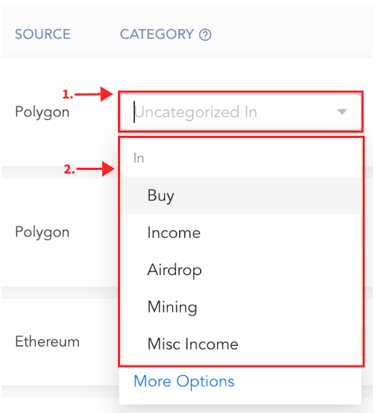
To edit an individual transaction’s category, select the drop-down under the “Category” section of the transaction, then select the desired category. Once the category has been edited, you can filter for that specific category on the Transactions page and also see the category segregated in the reports.
For more information on categories, how to edit and bulk edit transactions, or how to create rules, please refer to the following guides: