
In this article, we describe where to find the journal entry report and what is included in the journal entry report, which is accessible with or without a connection to a local ERP.
Transaction-level journal entries with debits and credits are broken down, and asset, asset quantity, and USD values are included in each journal entry.
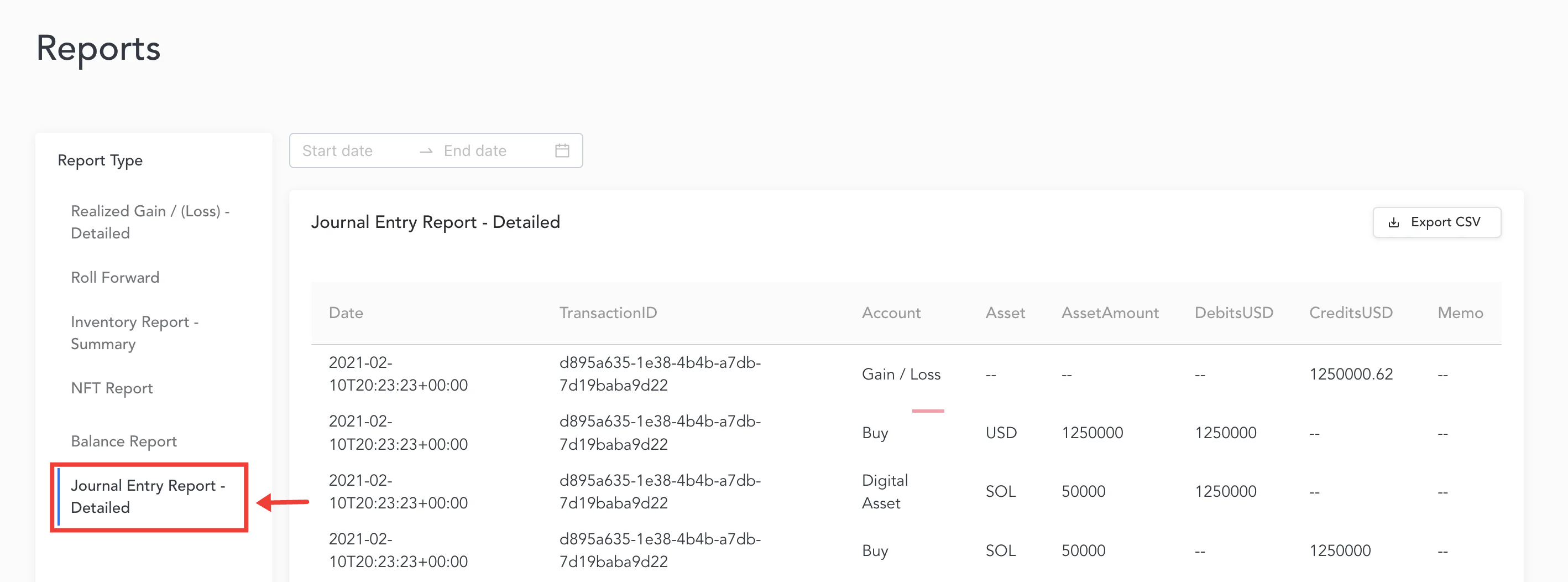
This report will include the following information for each entry:
Date
The date and time that the transaction took place.
Transaction ID
The transaction id associated with the transaction. Multiple entries for the same transaction will display the same transaction id.
Account
The account label included in the journal entry report is associated with either the transaction’s category/transaction type or the realized gain/loss generated.
Asset
The asset used in the particular entry.
Asset Amount
The amount listed for each entry.
Debits USD
The amount for debits involved in the entry.
Credits USD
The amount for credits involved in the entry.
Memo
If there is a memo involved in the transaction, it will show in this column.