
In this guide, you will find information on the Split Journaling feature within the Taxbit Accounting Suite.
Contents
- What is Split Journaling?
- Why Does Split Journaling Matter?
- How to Apply Split Journaling
- How Does Split Journaling Display?
What is Split Journaling?
Split Journaling is a feature within the Taxbit Accounting Suite that enables you to allocate a specific fiat amount, token amount, or percentage to both your inbound and outbound activities across multiple mapped general ledger accounts within your ERP. This provides you with the ability to sync entries to your Chart of Accounts with more precision and flexibility, ensuring you can accurately record your activity within your booking system.
Please note: This feature is now available, but it needs to be enabled. If you are interested in this feature, please contact your CSM, and they can assist in enabling it for you.
Why Does Split Journaling Matter?
Split journaling enables precise, rule-based accounting by automatically allocating portions of a single transaction to multiple general ledger (GL) accounts. This level of granularity not only improves financial accuracy but also simplifies downstream reporting, compliance, and operational transparency, especially in complex or high-volume environments like crypto mining and revenue-sharing arrangements.
Example 1: Bitcoin Miner – Separating Block Rewards from Mining Fees
Consider a Bitcoin miner who receives a total reward of 4 BTC for successfully mining a block. This reward consists of two components:
- 3.125 BTC as the block reward
- 0.875 BTC as transaction fees paid by network participants
Rather than lumping the full 4 BTC into a single income account, the miner can use split journaling to separate the two sources of income into the necessary GL accounts based on the specific token amounts. Here's how the journal entries might look:
- 3.125 BTC → Block Reward Income Account
- 0.875 BTC → Miner Fee Income Account
This separation enables the business to track the profitability of different revenue streams more accurately, making it easier to analyze trends, model forecasts, or comply with regulatory reporting (e.g. revenue recognition) that distinguishes between various sources of cryptocurrency income.
Example 2: Revenue Sharing – Partner Liability Recognition
Now let’s look at a revenue-sharing scenario. Imagine a business has a partnership agreement that entitles a customer or affiliate partner to a 10% share of incoming revenue. If the business receives 3 BTC from a sale, split journaling can automatically allocate the appropriate amounts to the necessary GL accounts as follows, based on the revenue percentage:
- 2.7 BTC (90%) → Revenue Account
- 0.3 BTC (10%) → Customer Revenue Share Liability Account
By automating this split, the system ensures that the partner’s share is immediately recognized as a liability, reducing the risk of underpayment and making the settlement process transparent and auditable. It also helps keep revenue reporting clean by showing only the portion of income the company retains.
How to Apply Split Journaling
You can easily apply split journaling to your chart of accounts within the Accounting page as well as to specific transactions on the Transactions page by following the steps outlined below:
Apply Split Journaling From the Accounting Page
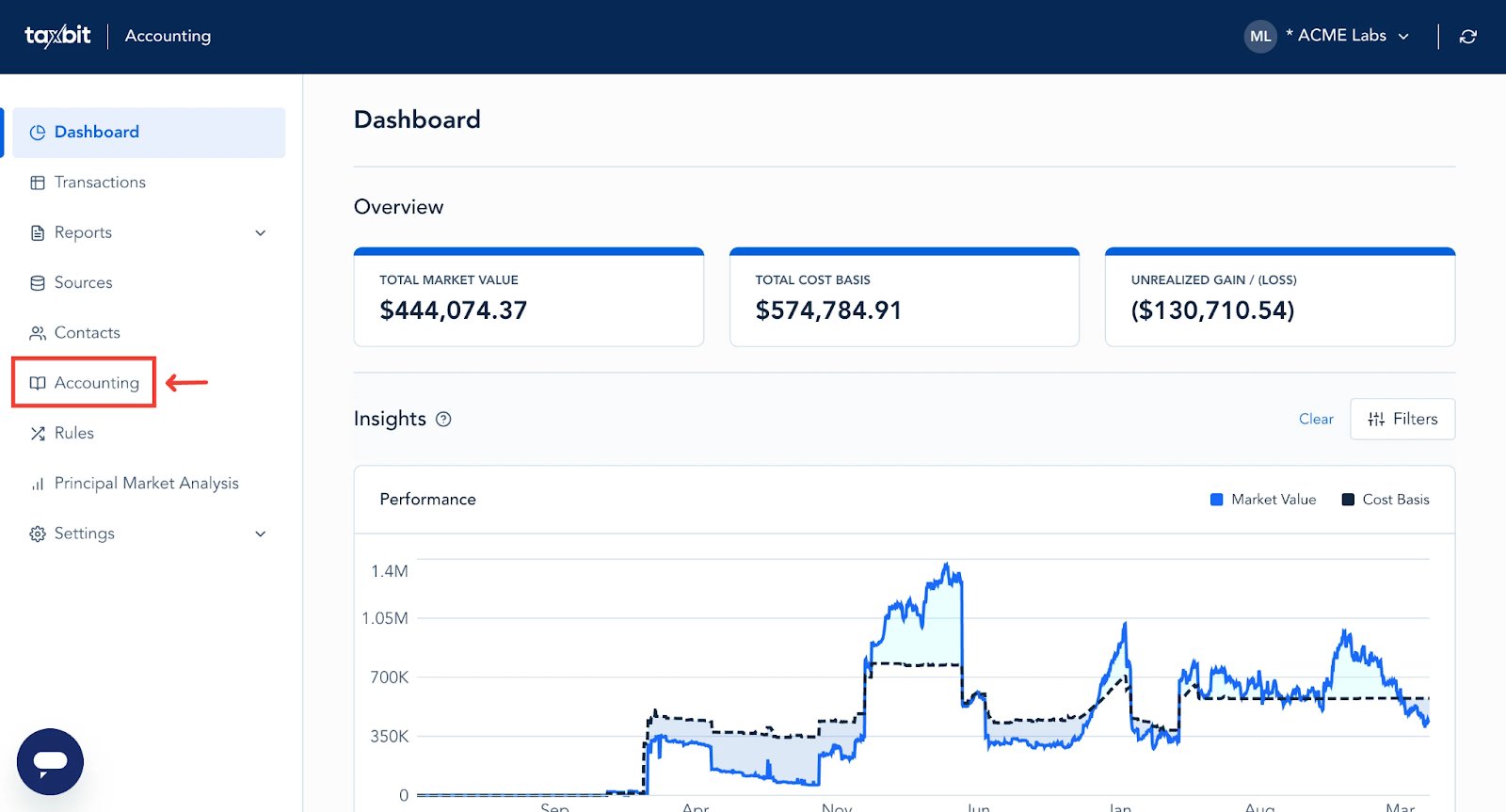
Step 1: Select “Accounting” from the left.
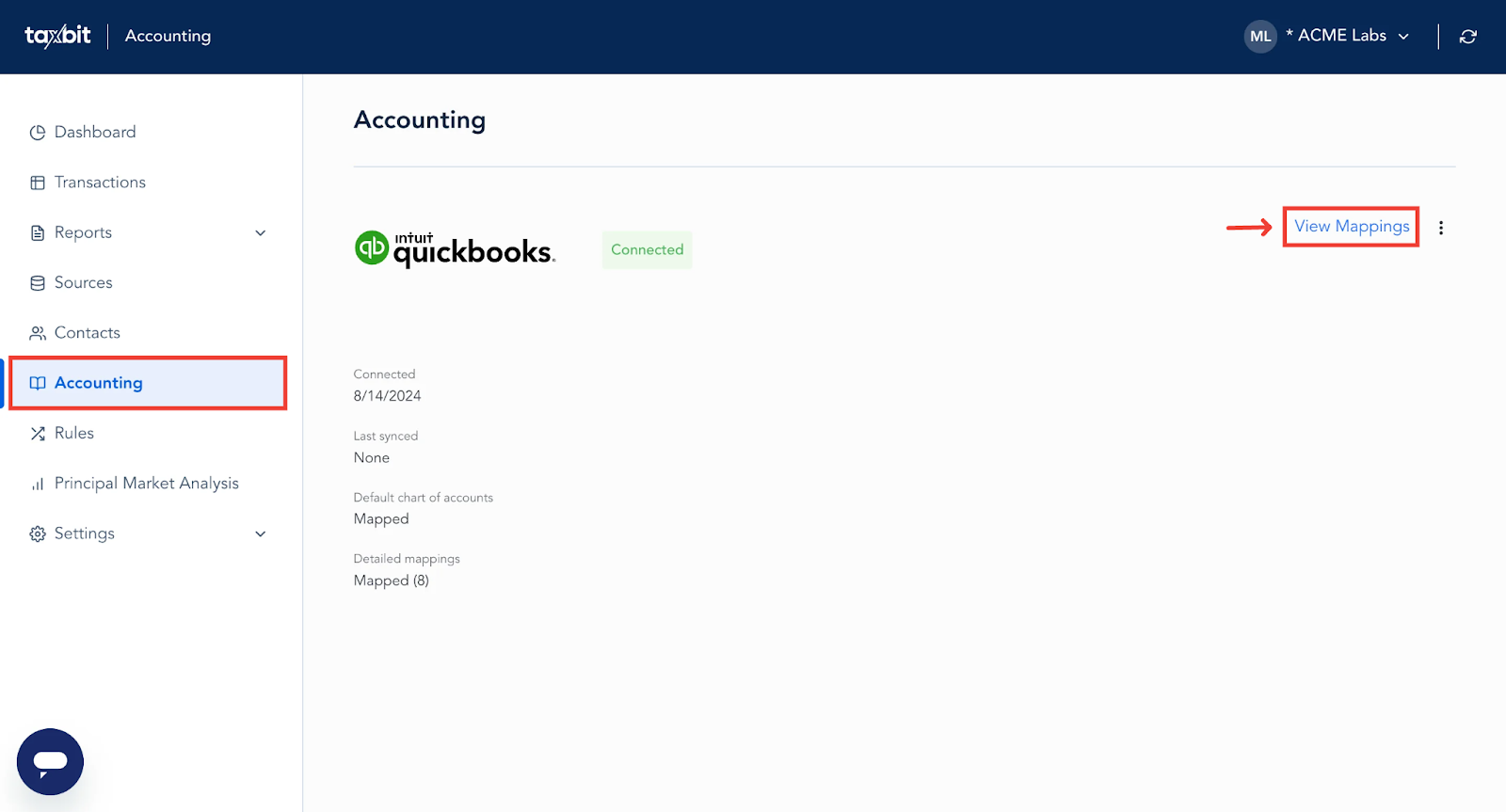
Step 2: From the Accounting page, select “View Mappings” from the top right.
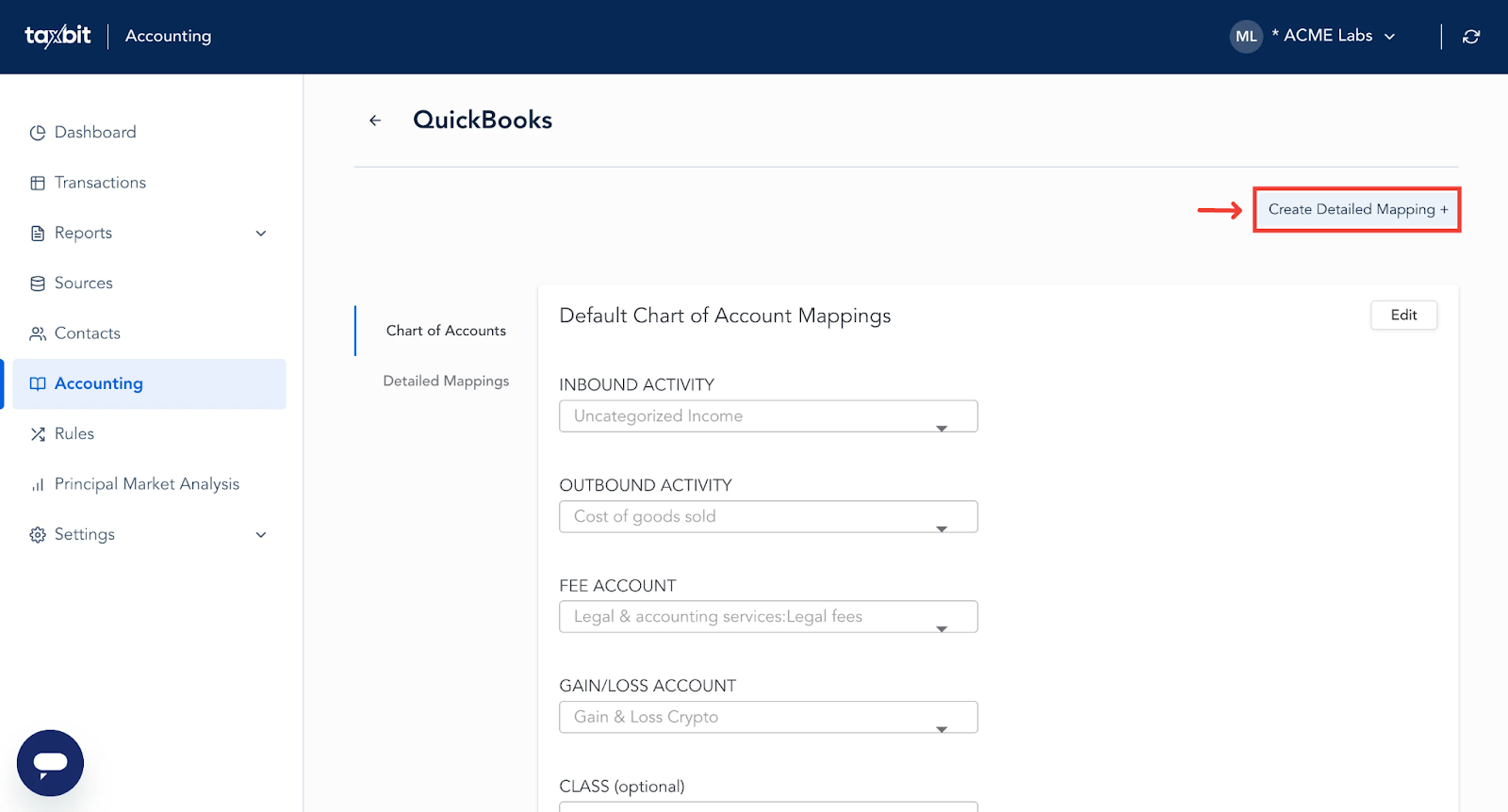
Step 3: Select “Create Detailed Mapping +” from the top right.
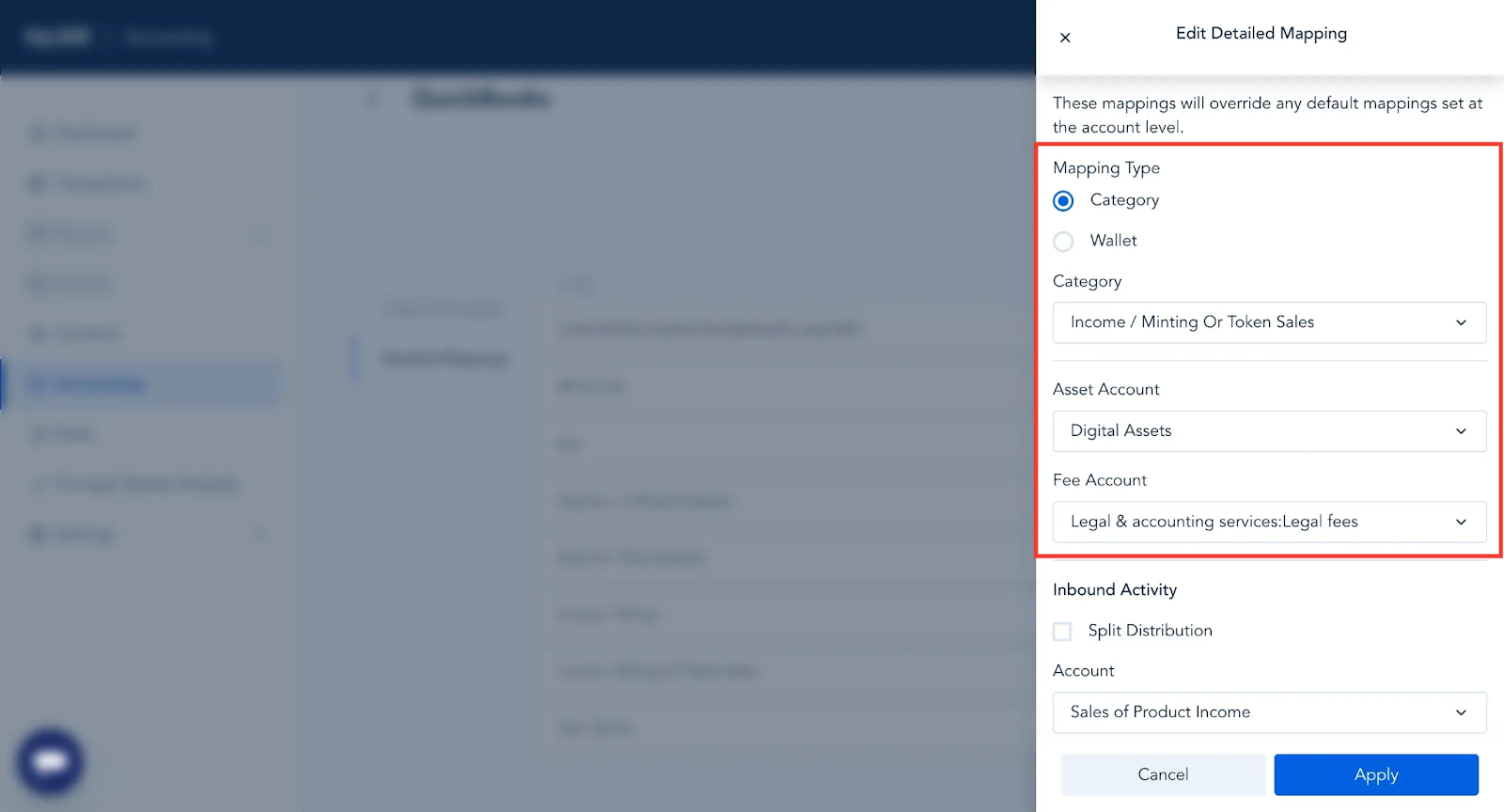
Step 4: Within the next window, select the Mapping Type (category or wallet), Asset account, and Fee account for this mapping.
For this example, I’m going to use the “Category” mapping type, and “Income/Minting Or Token Sales” as the category of the transactions we will be creating this mapping for.
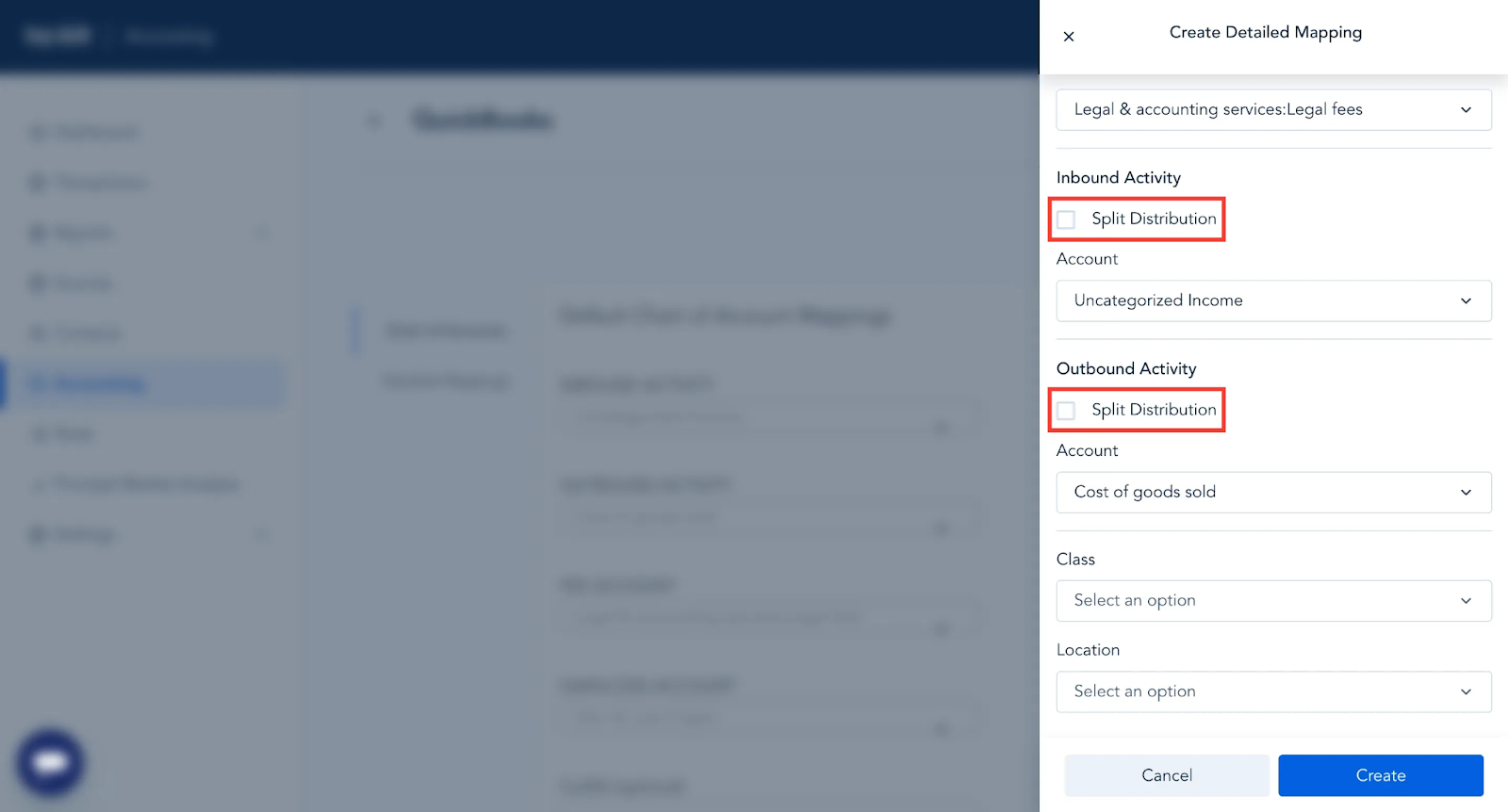
Step 5: Next, scroll down and check the box for “Split Distribution” for Inbound Activity and/or Outbound Activity, depending on your specific booking requirements.
For this example, we will be distributing accounts for Inbound Activity.
Step 6: Next, select how, and what you would like to distribute to each account. This can be via the following distribution types:
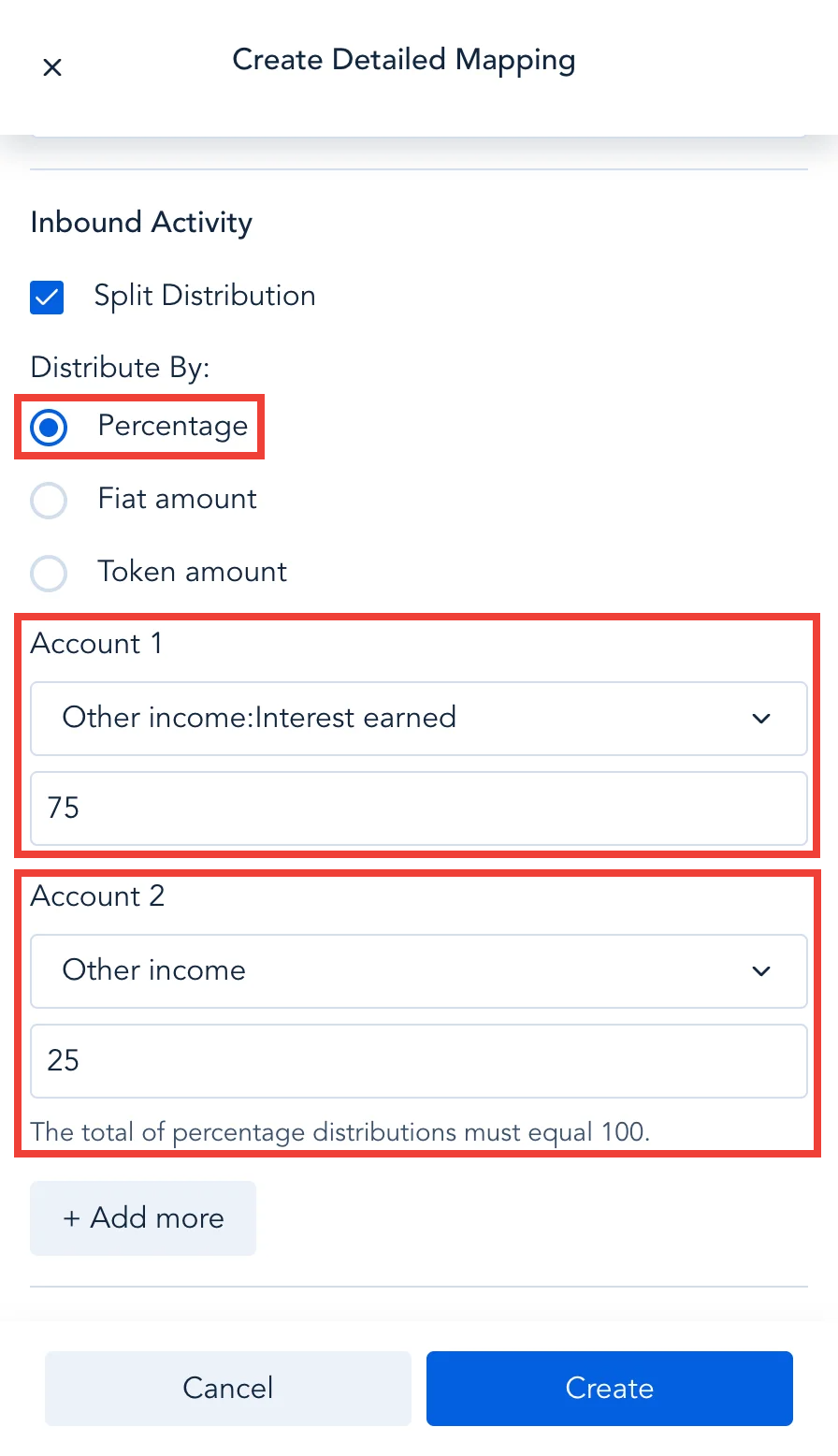
Percentage
You can distribute a certain percentage of the activity from the mapped transactions to specific ERP accounts until 100% of the distribution percentage has been met.
For example, in the screenshot below, I’m choosing to map 75% of the income from the transaction to sync to the “Other income: Interest earned” account and then the remaining 25% will sync to the “Other income” account.
Fiat Amount
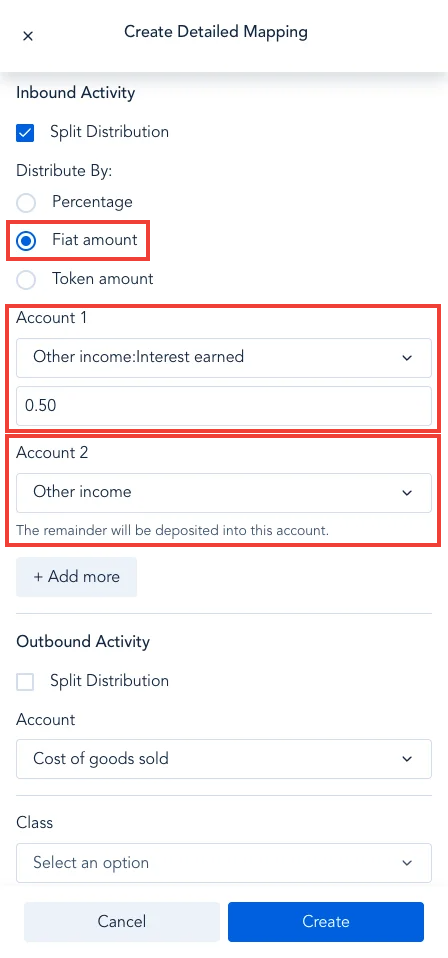
You can choose to distribute a specific fiat amount from the transaction(s) to specific ERP accounts.
For example, in the screenshot below, I’m choosing to distribute exactly $0.50 to the “Other income: Interest earned” account, and then any remaining fiat will be distributed to the “Other Income” account.
Token Amount
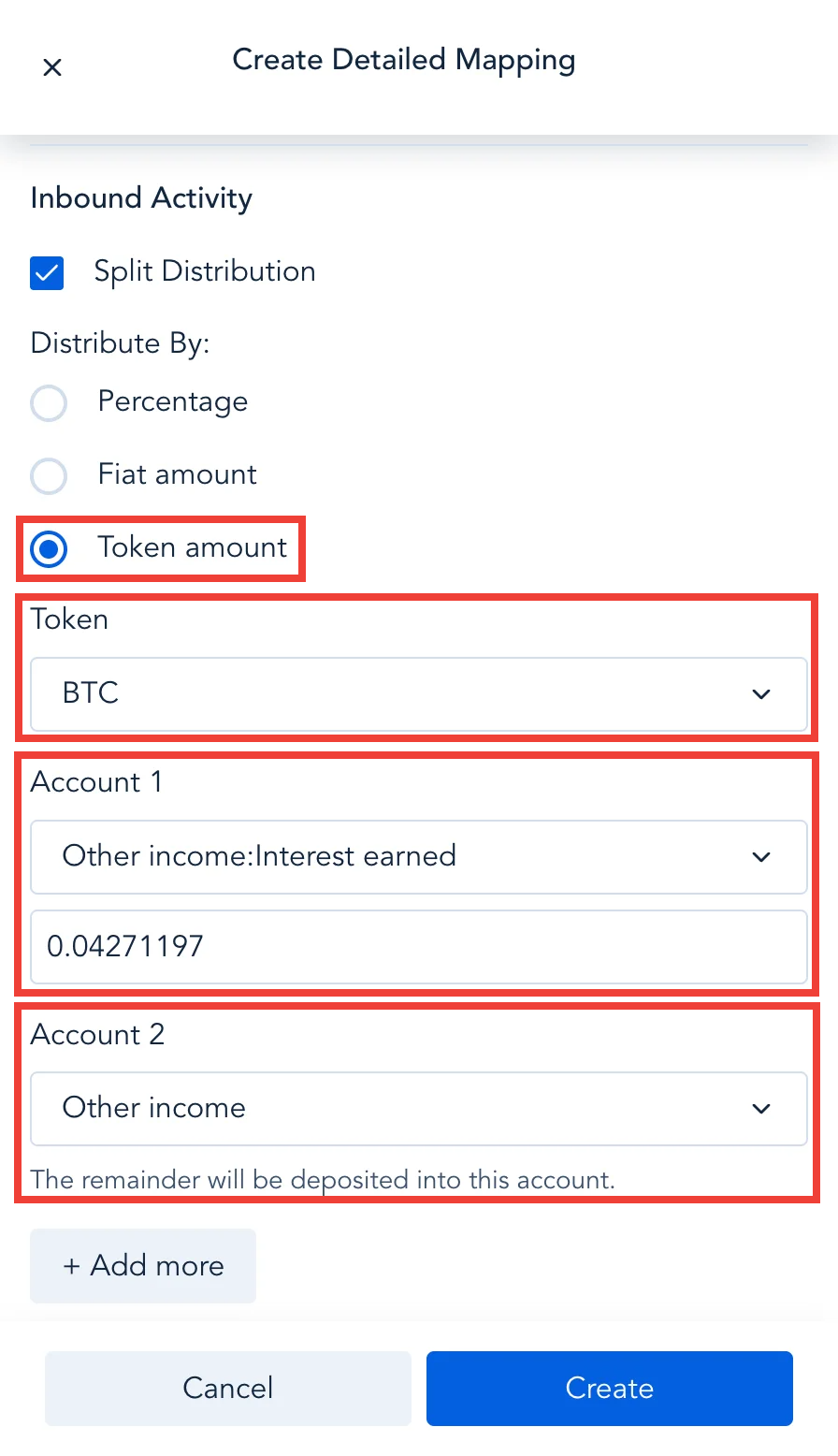
You can choose to distribute a specific token amount for a certain token from the transaction(s) to specific ERP accounts.
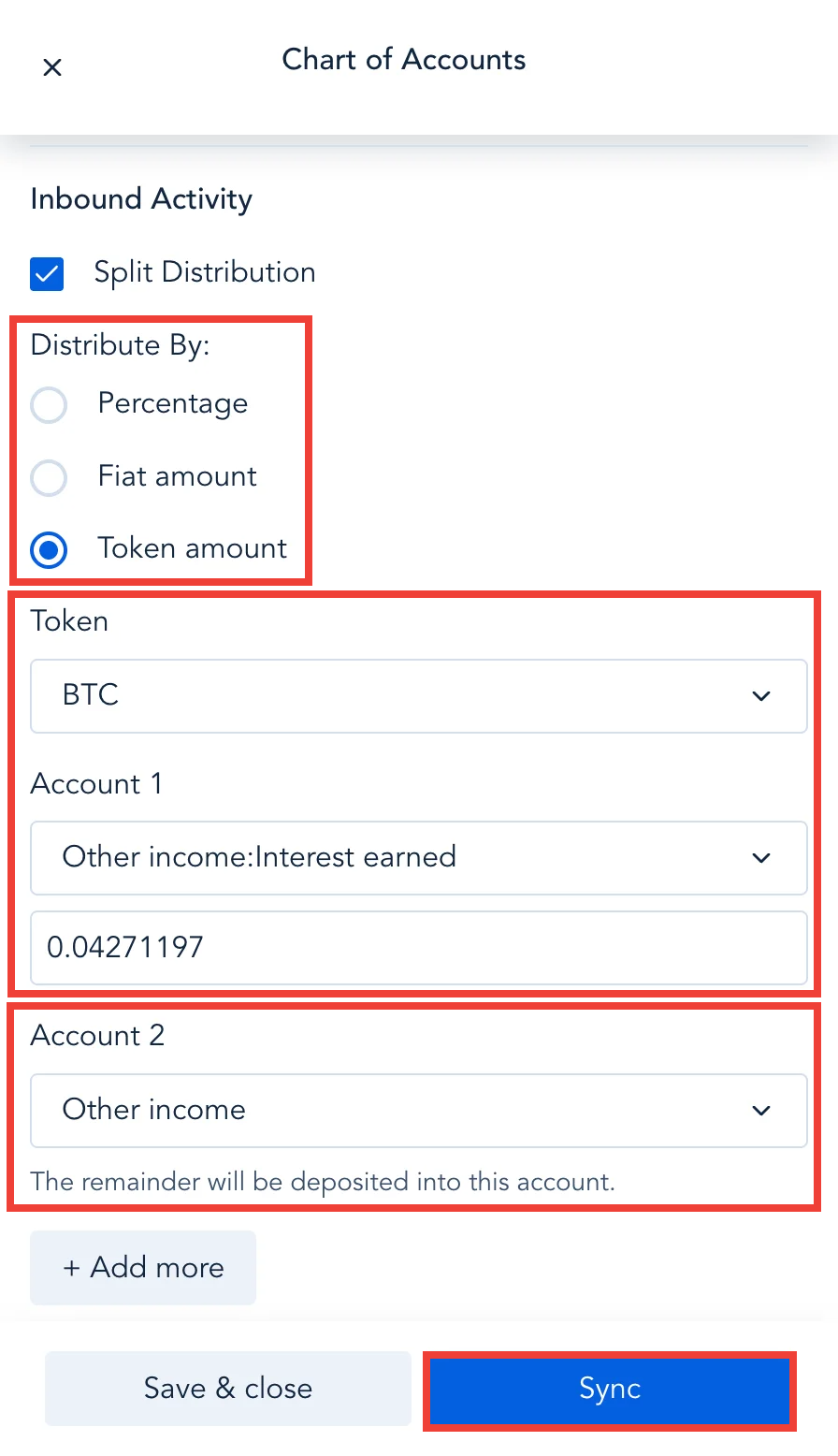
For example, in the screenshot below, I want to sync exactly 0.04271197 BTC to the “Other Income: Interest earned” account, and then the remainder of the BTC, if any, would sync to the “Other Income” account.
Apply Split Journaling at the Transaction Level
To apply distributions to accounts for specific transactions, please follow the steps outlined below:
Step 1: From the Transactions page, filter to the transaction(s) you wish to split the distribution for.
Step 2: Select the sync status icon on the right side of the transaction.
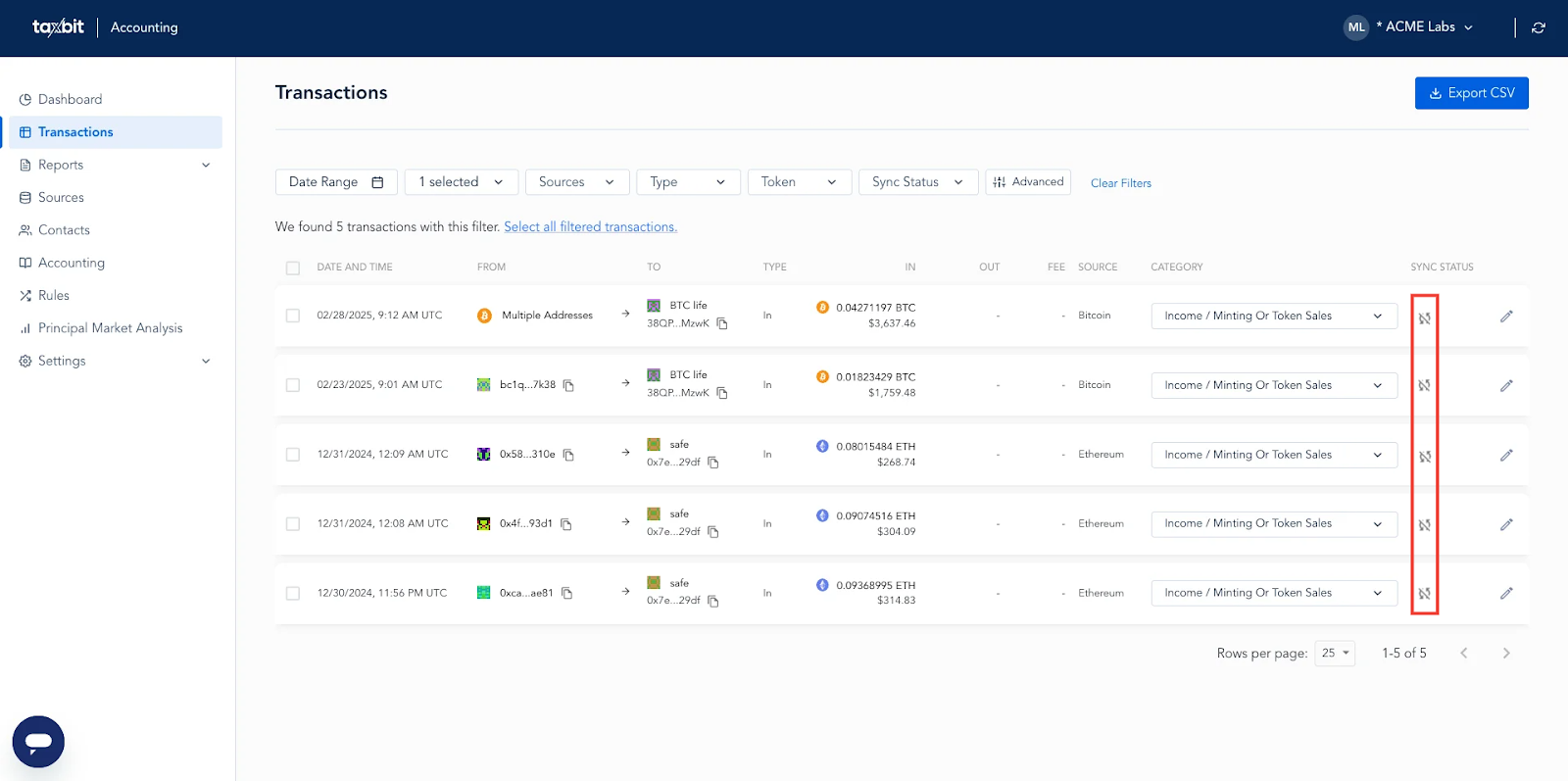
Step 3: From the Chart of Accounts window, check the box for “Split Distribution” next to Inbound Activity or Outbound Activity depending on your booking needs for the transaction(s).
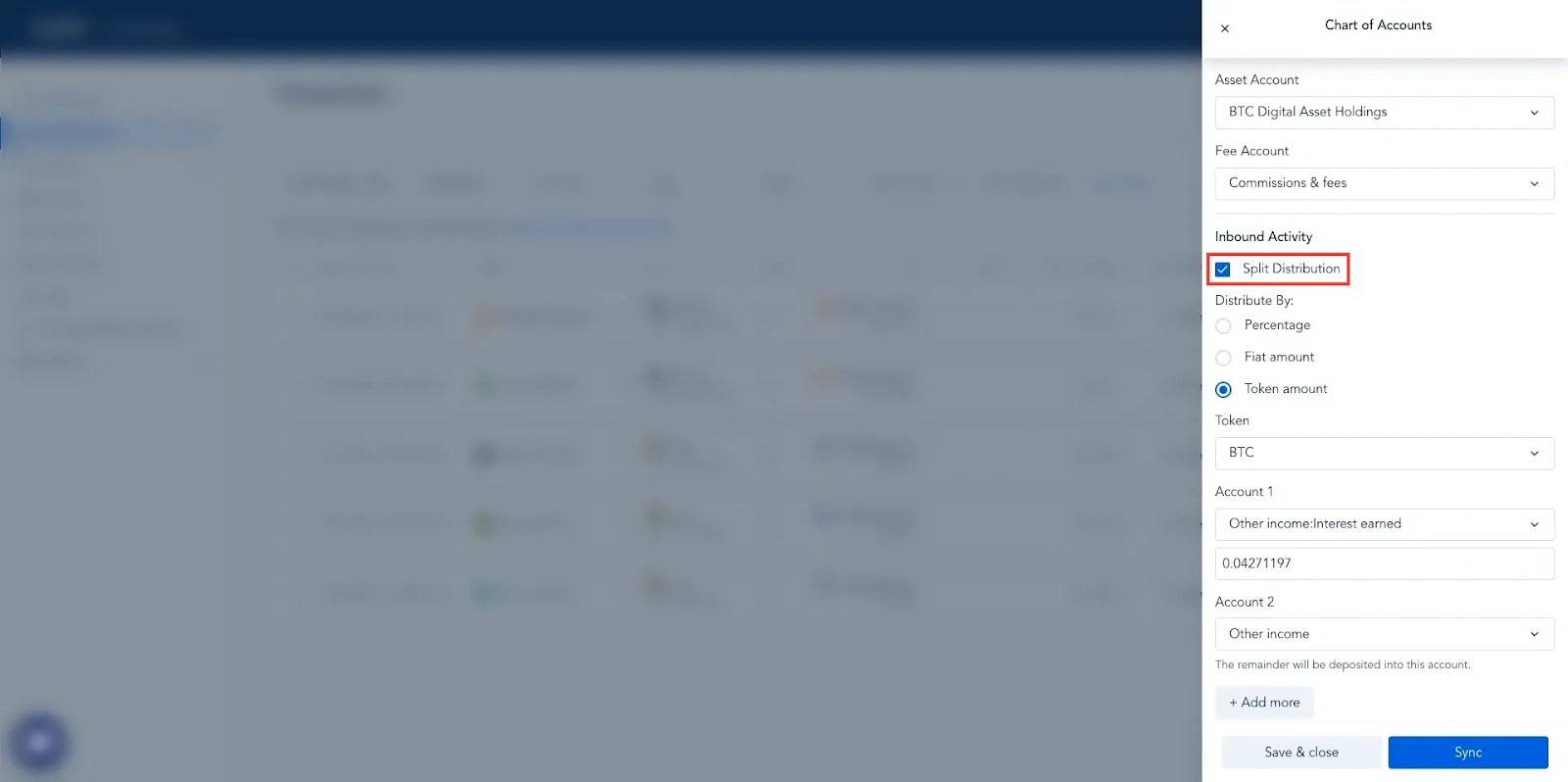
Step 4: Select your distribution type, the accounts that you are going to distribute to, the token (if using “Token amount” to distribute) as well as the amounts being distributed, then select “Sync”. This will sync the distributed amounts from the selected transaction(s) to the associated accounts within your connected ERP.
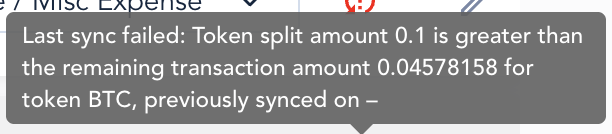
Please note: For the Amount or Fiat distribution types, if the amount of the token or the fiat value within the individual transaction(s) equals less than the token/fiat amount indicated in the Split Distribution mapping, then the transaction will fail to sync to the ERP. You will receive an error message similar to the one below, which is for the token amount example. To resolve, you will need to update the amounts listed within the Split Distribution at the transaction leve and then re-sync:
How Does Split Journaling Display?
You can preview how the journal entry or entries will display via the chart of accounts under the transaction details, or via the “Preview Journal” link within the transaction(s). Please see the details below for how each may display based on the different distribution types:
Percentage
Transaction Level Chart of Accounts
If you are using the Percentage distribution type, keeping the same example above in mind, the Chart of Accounts for this transaction reflects the following:
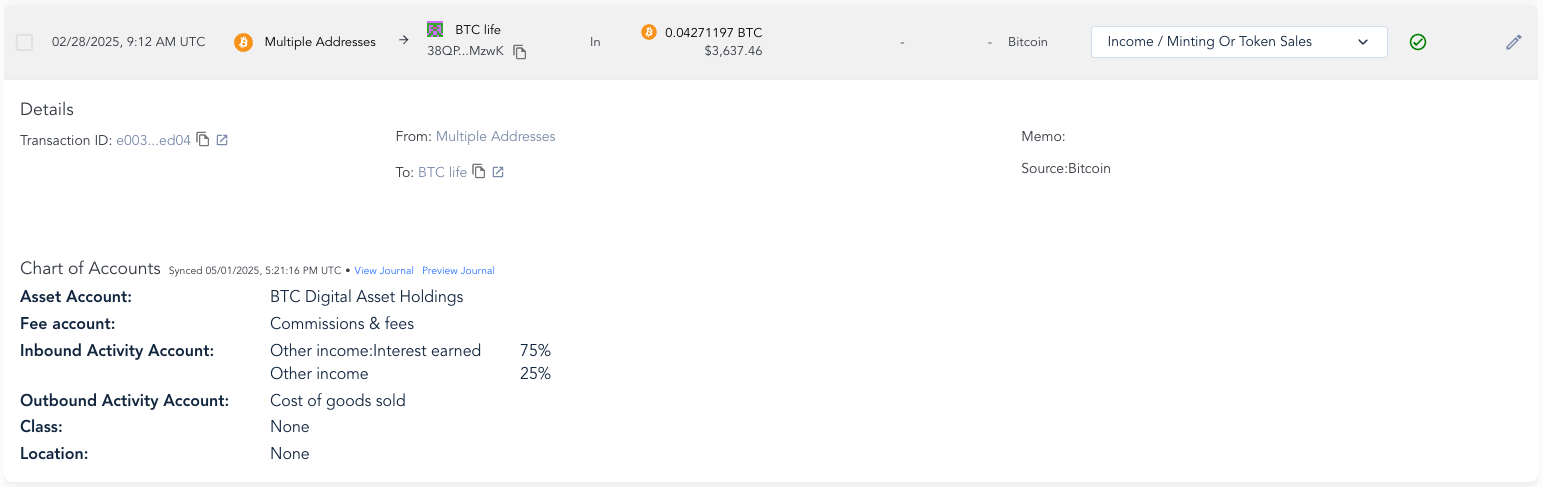
Asset Account: BTC Digital Asset Holdings
This is the asset account that is mapped for the BTC token specifically and is where the debit or credit will sync to for the full amount of BTC regardless of split distribution.
Please note: The asset account mapped at the transaction level overrides the default account mapping as well as the Asset Account selected in the detailed mapping.
Fee Account: Commissions & fees
This is the fee account that is mapped for any fees involved in the associated transaction(s).
Inbound Activity Account: Other income: Interest earned, Other income
These are the distribution accounts that were mapped for inbound activity. The percentage distributed to the “Other income: Interest earned” account is 75%, while the remaining 25% is distributed to the “Other income” account.
Outbound Activity Account: Cost of goods sold
This is the account selected to sync any outbound activity for this mapping.
Journal Preview
The Journal Previewer for this transaction shows that, if synced to the ERP, the entry will reflect as follows:
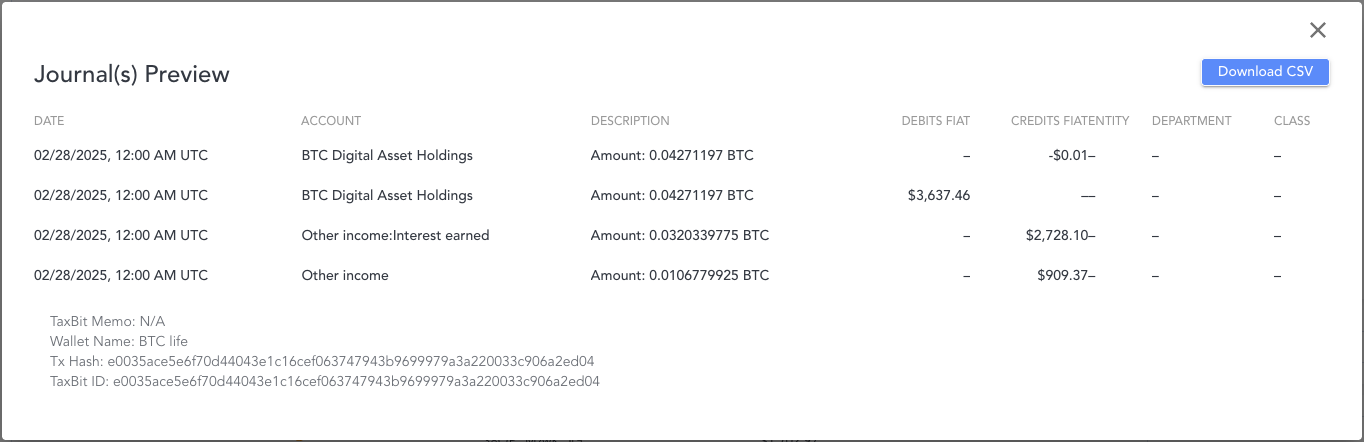
Accounts
- BTC Digital Asset Holdings
This account shows that the full amount of BTC involved in this transaction was synced to this account with the necessary Debits and Credits to balance it out.
- Other income: Interest earned
This account shows that 75% (0.0320339775 BTC) of the BTC in the transaction was synced to this account, which is a credit of $2,728.10.
- Other Income
This account shows that the remaining 25% (0.0106779925 BTC) of the BTC in the transaction was synced to this account, which is a credit of $909.37.
Fiat Amount
Transaction Level Chart of Accounts
If you are using the Fiat Amount distribution type, keeping the same example above in mind, the Chart of Accounts for this transaction reflects the following:
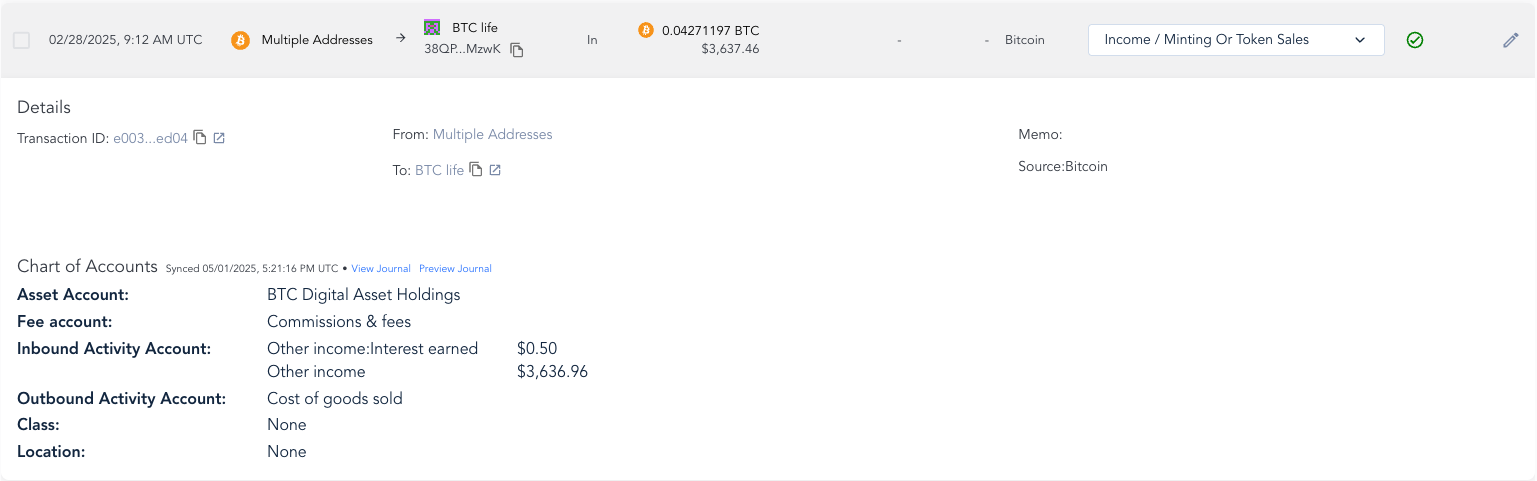
Asset Account: BTC Digital Asset Holdings
This is the asset account that is mapped for the BTC token specifically and is where the debit or credit will sync to for the total value of the full amount of BTC regardless of split distribution.
Please note: The asset account mapped at the token level overrides the default account mapping as well as the Asset Account selected in the detailed mapping.
Fee Account: Commissions & fees
This is the fee account that is mapped for any fees involved in the associated transaction(s).
Inbound Activity Account: Other income: Interest earned, Other income
These are the distribution accounts that were mapped for inbound activity. The total fiat value of the BTC in this transaction is $3,637.46, however, in our example, we specified to sync only $0.50 of that to the “Other income: Interest earned” account, and the remainder of $3,636.96 was synced to the “Other income” account.
Outbound Activity Account: Cost of goods sold
This is the account selected to sync any outbound activity for this mapping.
Journal Preview
The Journal Previewer for this transaction shows that, if synced to the ERP, the entry will reflect as follows:
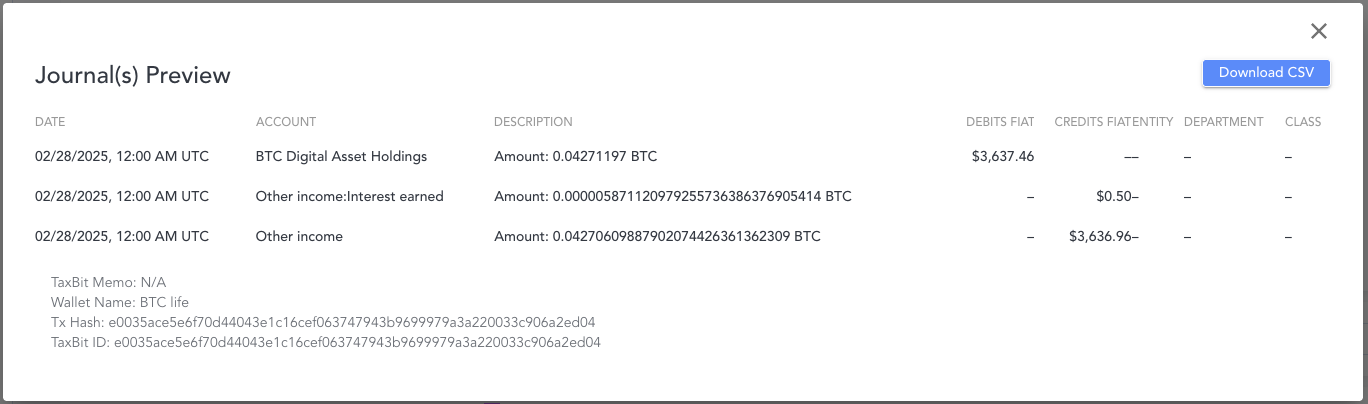
Accounts
-
- BTC Digital Asset Holdings
This account shows that the full value of the BTC involved in this transaction of $3,637.46 (0.04271197 BTC) was synced as a debit.
- Other income: Interest earned
This account shows that a $0.50 (0.0000059 BTC) of the BTC value was synced as a credit.
- Other Income
This account shows that the remaining $3,636.96 (0.04271 BTC) BTC value in the transaction was synced as a credit.
Token Amount
Transaction Level Chart of Accounts
If you are using the Token Amount distribution type, keeping the same example above in mind, the Chart of Accounts for this transaction reflects the following:
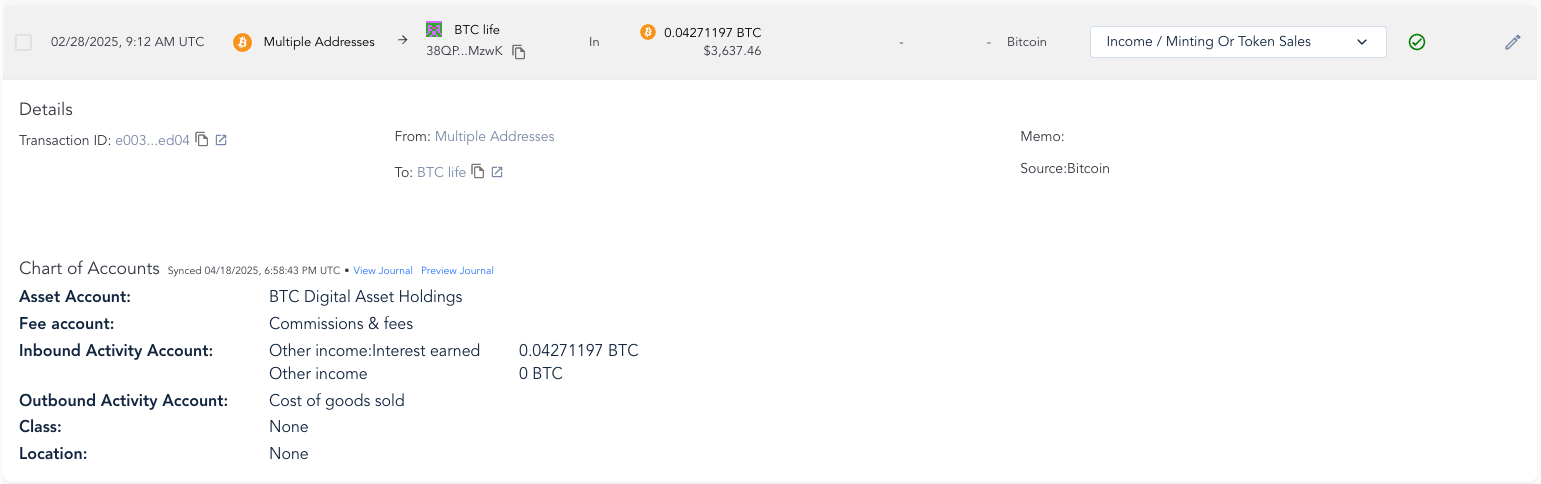
Asset Account: BTC Digital Asset Holdings
This is the asset account that is mapped for the BTC token specifically and is where the debit or credit will sync to for the full amount of BTC regardless of split distribution.
Please note: The asset account mapped at the token level overrides the default account mapping as well as the Asset Account selected in the detailed mapping.
Fee Account: Commissions & fees
This is the fee account that is mapped for any fees involved in the associated transaction(s).
Inbound Activity Account: Other income: Interest earned, Other income
These are the distribution accounts that were mapped for inbound activity. The amount in this transaction is for exactly 0.04271197 BTC, which is also the amount that was input for the distribution amount.
This amount (0.04271197 BTC) is being synced to the “Other income: Interest Earned” account, and there is no BTC left over to distribute the remainder to the “Other income” account, so it reflects 0 BTC to the right of it.
Outbound Activity Account: Cost of goods sold
This is the account selected to sync any outbound activity for this mapping.
Journal Preview
The Journal Previewer for this transaction shows that, if synced to the ERP, the entry will reflect as follows:
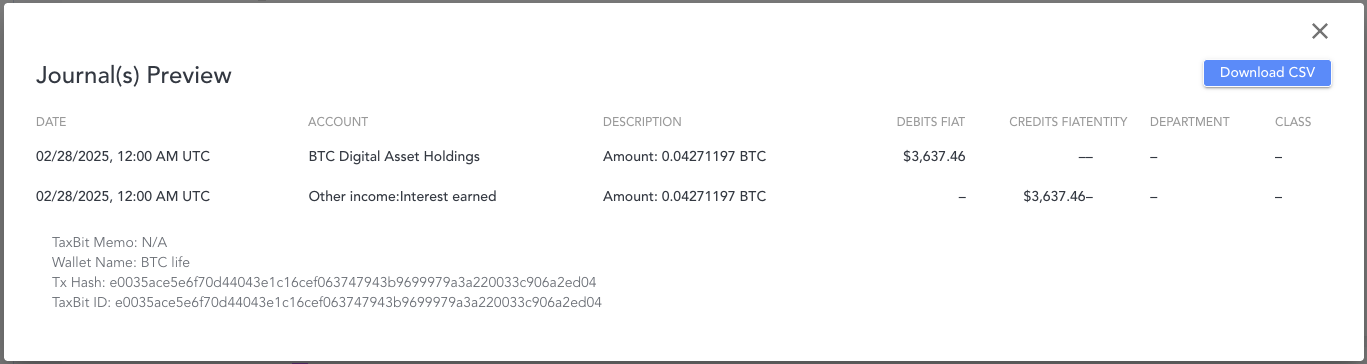
Accounts
-
- BTC Digital Asset Holdings
This account shows that the full value of the BTC involved in this transaction of $3,637.46 (0.04271197 BTC) was synced as a debit.
- Other income: Interest earned
This account shows that 0.04271197 BTC was synced, with a $3,637.46 credit.
- Other Income
The full amount of the transaction was synced to the “Other income: Interest earned” account, so this account is not reflected within this entry since nothing was distributed to it.